
Getting ahead of Buen Fin with every offer in one block
A campaign landing page and a home page takeover inside the existing site, in three pieces: the campaign home page, the campaign landing page and the component board.
- Role
- UX/UI design
- Runs
- November 9–12, 2026
- Scope
- Mobile · 393 px · Figma
- Status
- Pre-launch
sections on the campaign home page
tall, the campaign home page
tall, the campaign landing page
Category Drop states
Empathize
The first question is what it applies to
Buen Fin is Mexico's biggest shopping season of the year, and during those days every retailer competes for the same shopper. Petco's strategy was to get there first: open its discounts early, to win the purchase before the shopper's budget is split across other stores.
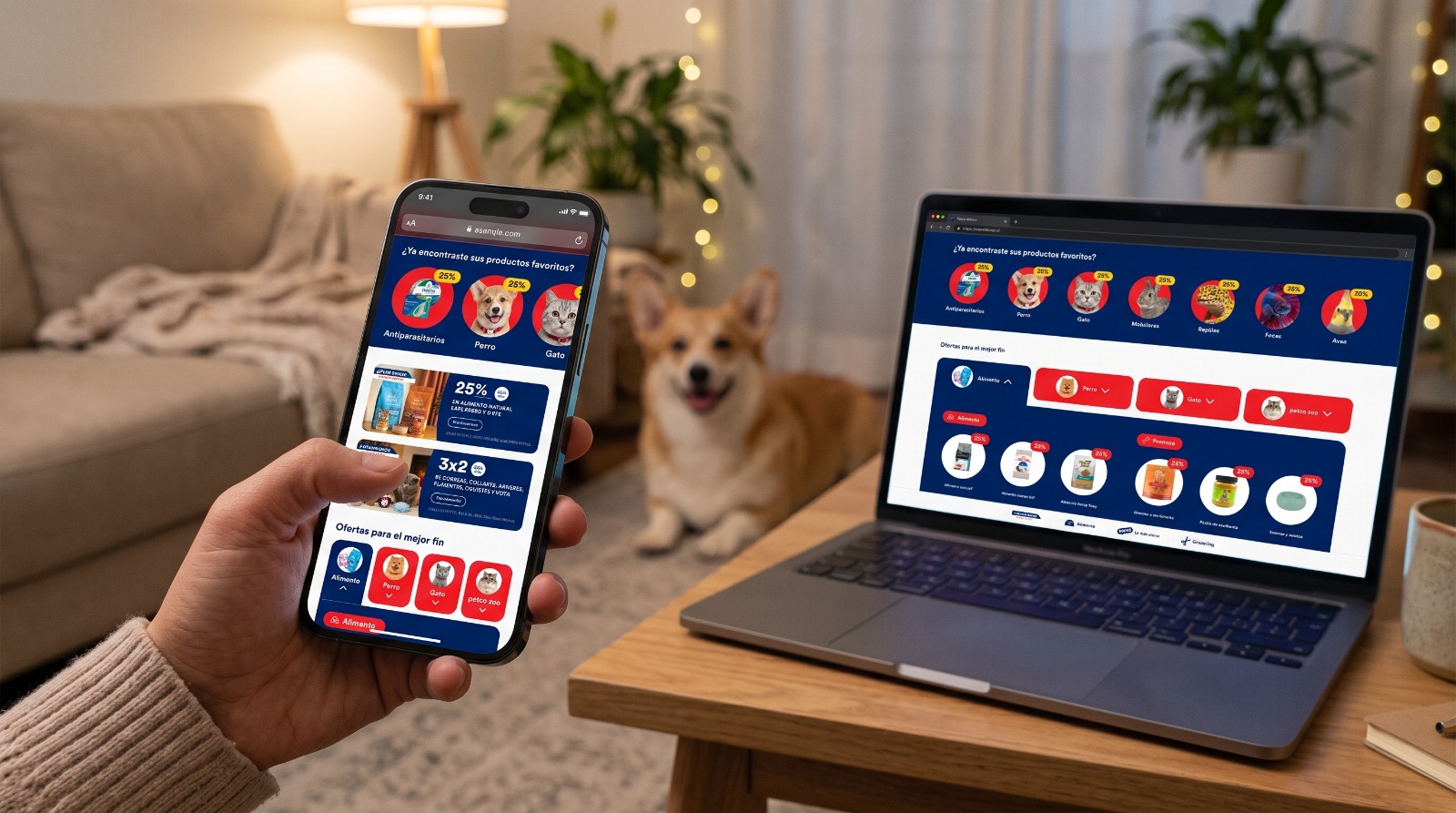
From Hot Sale 2026 and the 13th Anniversary campaign, we know the seasonal shopper:
Arrives on mobile, through paid media, email or push.
Looks for the deal mechanic (25%, 3-for-2, +5% Club Petco) before the product.
Leaves if they have to guess which category each promotion applies to.
There are five archetypes: the food stocker, the gift and fashion shopper (3-for-2), the preventive-care pet parent, the minority-species owner and the Club Petco member.
“The shopper's first question is “what does it apply to?”. Conditions that only appear at checkout create friction and abandonment.”
Define
Connecting each mechanic to its category
Pet parents browsing on their phones during the campaign need to understand quickly which discount applies to which category for their pet. Today seasonal promotions are communicated as loose pieces, without connecting each mechanic to its category and its conditions.
How might we show every promotion by pet without building an endless landing page?
How might we explain the 3-for-2 at the moment of decision, not just in the fine print?
How might we turn the home page into a campaign showcase without breaking its usual paths?
How might we make birds, fish, reptiles and small mammals visible?
How might we make every promotion understandable for people with low vision or who use a screen reader?
The metrics that track the outcome are traffic from the home page to the landing page, interaction with the pet selector, landing page conversion, the share of orders with a complete 3-for-2, and Petco Zoo sales.
Ideate
One surface announces, the other converts
“We brought the best end forward.”
The concept is framed as early access to the discounts, and it is split across two surfaces with different jobs:
| Surface | Role |
|---|---|
| Campaign home page | Announce and distribute. It keeps services, blog and guarantees, and adds the campaign pieces above the fold. |
| Campaign landing page | Convert. It goes straight to offers by pet, brands, category showcases and payment methods. |
One central component with states instead of many sections
The Category Drop organizes the whole offer into 4 tabs: Food, Dog, Cat and petco zoo.
Chips were dropped because of development time
An accordion per tab was used instead: it does the same job and could already be built.
The mechanic is shown on every item
The 25% and 3-for-2 badges sit on each category, and the conditions live inside their tab, for example “Add 3 products to apply the 3-for-2”.
The campaign has a “Buen Fin mode”
Campaign red on navy: the background changes, but the component system does not.
There is a block dedicated to minority species
“Surprise the little ones!” speaks to people with birds, fish, reptiles or small mammals.
Prototype
Two surfaces and one central component
Campaign home page: 20 sections across 7,619 px. The campaign pieces are the snackbar, the showcase, the 25% and 3-for-2 cards, the Category Drop, the parasite protection block and the brand grid. The home page's fixed blocks stay in, in a red version.
Campaign landing page: 4,721 px. It includes:
A hero with the fine print strip in live text.
The Category Drop.
5 category showcases (a Promo Tile followed by Product Cards).
The interest-free installments banner.
The guarantees.
Floating DOG and CAT buttons.
The central component is the Category Drop. It has 5 states: closed, Food, Dog, Cat and petco zoo. Only one tab is open at a time. The active tab merges into the navy panel, and each group shows category circles with a badge, a conditions note and a CTA.
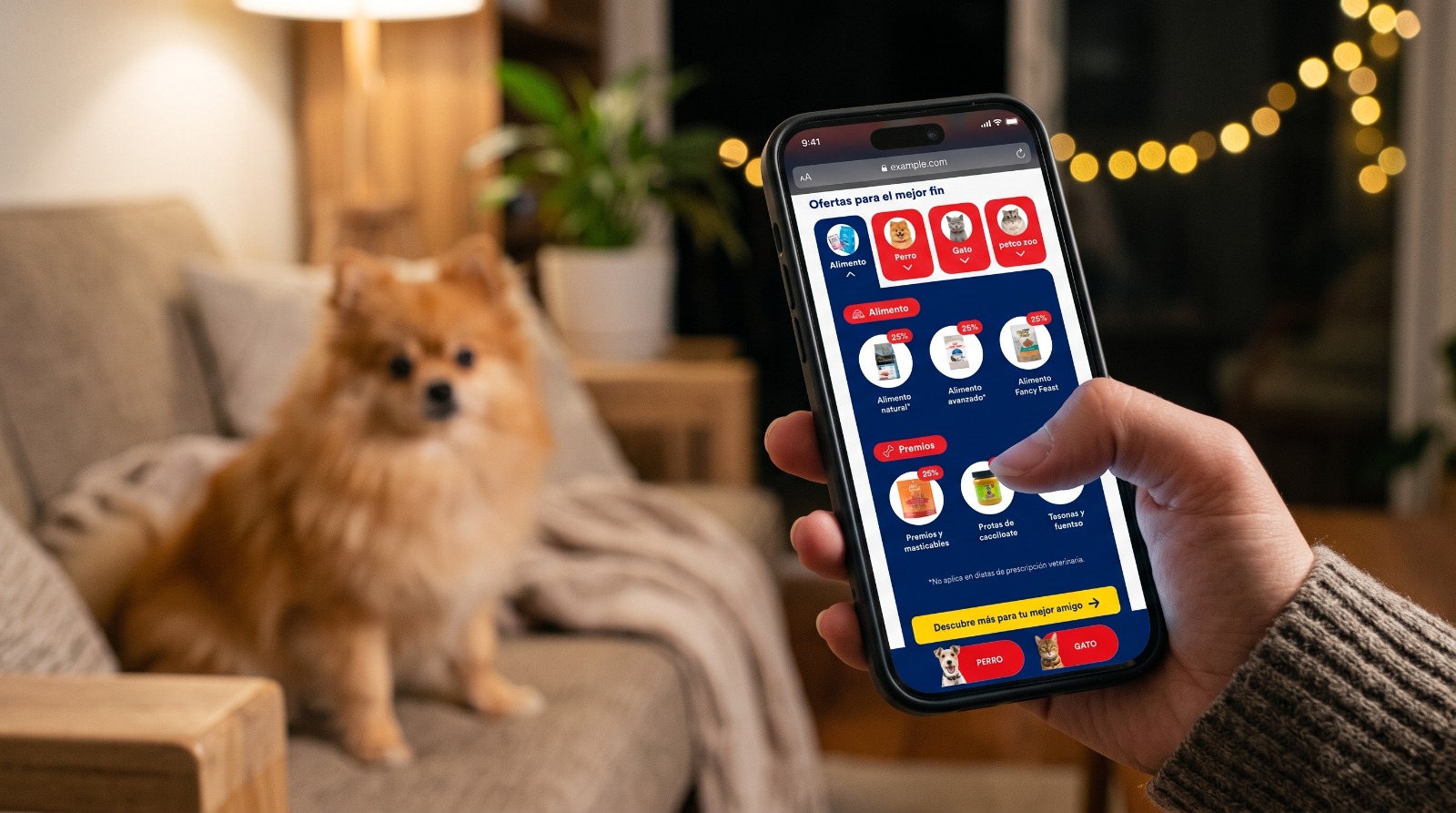
The board also includes new components (Badge, Brand grid, Wide showcase, LP hero and Circular item) and reuses design system components (Promo Tile, Product Card, Service Tile and Footer).
The campaign's visual system:
Campaign red #ED1C24
Navy #00205B
CTA yellow #FFD405
Petco Circular CAP typeface
Accessibility
WCAG 2.2 AA in Buen Fin mode
The target is WCAG 2.2 level AA, reviewed on the mockups of the campaign home page, the landing page and the Category Drop.
Already solved in the mockup:
| Criterion | How it was solved |
|---|---|
| 1.4.5 Images of text | Fine print, dates and purchase limits are live text, not part of the artwork. |
| 3.3.2 Labels or instructions | Conditions (3-for-2, limits, exclusions) are visible before the decision, not only at checkout. |
| 1.4.1 Use of color | The mechanic is stated in text (“25%”, “3x2”), not with color alone. |
| 2.2.2 Pause, stop, hide | The showcase has a pause button. |
| 1.4.3 Contrast | White on navy ≈ 15:1 and navy on yellow ≈ 10.7:1. |
| 4.1.2 Name, role, value | The drop is specified as an accordion with aria-expanded. |
The review found twelve pending adjustments:
| Criterion | Finding | Fix |
|---|---|---|
| 1.4.3 Campaign red | White text on #ED1C24 red ≈ 4.4:1. It fails for normal text and only passes for large text (≥ 18.66 px bold). | Use the red only behind large headlines and put small text on navy or white, or darken the red to #D6141B or darker. |
| 1.4.3 “30% OFF” badge | White on Red_Petco #FB4341 ≈ 3.5:1, with small text. | Darken the badge background or use navy text. |
| 1.4.3 Navy on red | Navy on red ≈ 3.5:1. | Do not use navy text on a red background, except for large headlines. |
| 1.4.3 Ray pattern | The ray pattern behind the text makes contrast inconsistent. | Put a solid layer behind the text or keep the pattern out of the reading area. |
| 1.4.4 Resize text | Fine print and product names at 11 px, and Promo Tile text at 12 px. | Raise them to 12–14 px and test text at 200% without clipping. |
| 1.4.1 / 4.1.2 Active tab | The active tab is told apart mostly by its background color. | Rotate the chevron and announce “expanded” or “collapsed”. |
| 2.4.3 Focus order | Opening a tab makes the panel push the content down. | Move focus to the first item in the panel and keep a logical order when it closes. |
| 2.4.11 Focus not obscured | The floating DOG and CAT buttons and the fixed bottom navigation can cover the focused content. | Add scroll-padding-bottom equal to their height and hide the floating buttons when a CTA sits beneath them. |
| 2.4.4 Link purpose | “See products” and “Learn more” repeat. | Add an aria-label with context, for example “See 3-for-2 products in toys”. |
| 1.1.1 Non-text content | There are photos in the circles, brand logos and payment method logos. | Alt text on all of them, and badges announced as “25% off”. |
| 2.5.7 / 2.1.1 Dragging and keyboard | The showcases are swipe carousels. | Add arrows or allow focus per card. |
| 2.3.3 Animation | The drop changes height with a transition. | Respect prefers-reduced-motion. |
Evaluate
Four hypotheses to measure
| Hypothesis | Measurement |
|---|---|
| The Category Drop helps people find the offer faster than a list of sections | Tab opens and time to first click |
| Putting the 3-for-2 condition inside the tab increases orders with a complete 3-for-2 | % of orders compared with Hot Sale 2026 |
| The petco zoo tab increases minority-species sales | Clicks and Petco Zoo sales |
| Showing limits before checkout reduces abandonment | Cart-step abandonment and support tickets |
There are four evaluation methods:
A quick test with 5 users on the drop prototype, including one session with a screen reader and one using only the keyboard.
Analytics by tab and by position.
Heatmaps.
A close-out comparison against Hot Sale 2026.
The project is in pre-launch, so the figures in this case describe its scope, not its impact, and this stage is an evaluation plan.
Implement
From handoff to November 9
Handoff
Drop behavior (one tab at a time, pushes content down, focus and aria-expanded), where each circle leads to in the filtered PLP, rules for the floating buttons, asset slots, and fine print always in live text.
Governance
The drop's structure stays. Between campaigns only the products, badges, notes, artwork and background color change, and every color change is checked against the contrast ratios in this review.
Next steps, in order:
Apply the red contrast fixes.
Publish the Category Drop to the library for the official Buen Fin and for Chile.
Build the prototype for testing.
Tag analytics before November 9.
Design the desktop version.
Thanks for watching!
See another project?